
Brian2 Atlas is now open source. The engine repository, v2 preprint and reproduction materials are publicly available. For a visual introduction, there is also a 22-slide overview.
Atlas brings the Brian2 modelling interface together with native CPU simulation, Apple Metal and NVIDIA CUDA execution, browser WebAssembly, distributed MPI execution and native training. This article explains the ideas behind the engine and a few of the experiments that shaped it. The Brian2 Atlas page collects the current introduction, installation path and research resources.
Why build an execution architecture?
A neural model starts with equations, connections and rules about when things happen. Moving that model to another device involves decisions about where its state lives, which operation runs first, and how a spike reaches its destination. Those decisions become especially visible when a network crosses process or machine boundaries.
Brian2 provides a flexible way to describe models in Python. Atlas retains that modelling interface and develops the execution architecture underneath it. The central question is how to preserve a model's declared behaviour while changing the way work is scheduled and distributed.
For example, an optimization that reuses a value must know whether another operation changes that value before it is consumed. A distributed simulation must know which rank owns a synapse and when a delayed event should be delivered. These are part of the model-to-execution relationship, and need to be represented explicitly.
One representation, several execution paths
AtlasIR, the Atlas Intermediate Representation, describes typed state, clocks, schedules, effects, events and random-stream identities. An independent Rust validator checks this representation. Execution-plan analysis then constrains transformations such as storage layout, ordering and ownership.
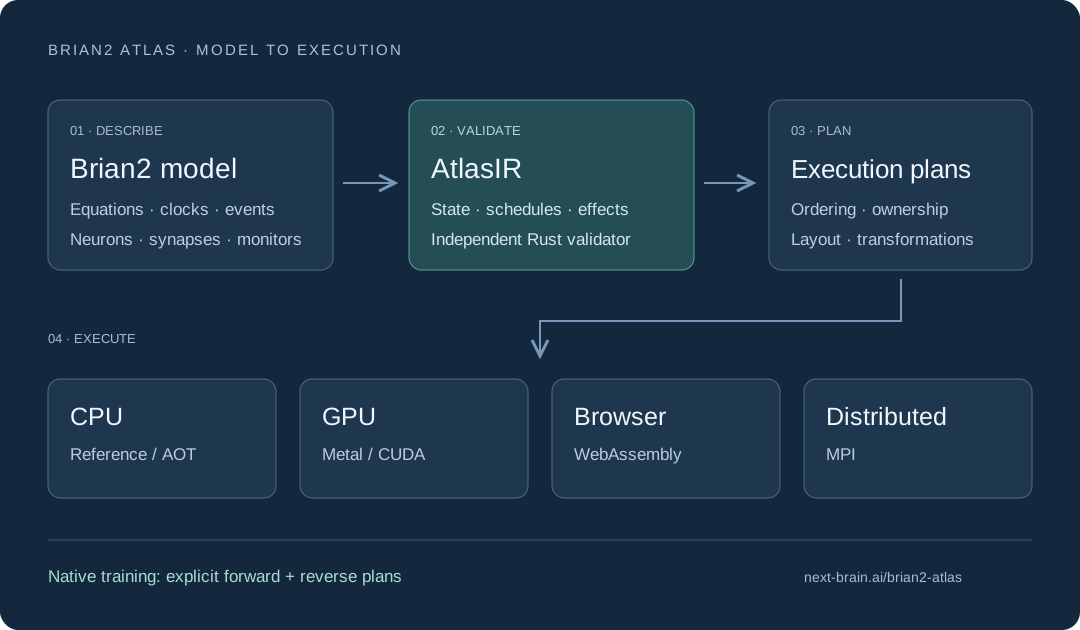
Architecture overview. Brian2 supplies the modelling frontend; AtlasIR and execution plans connect it to the Atlas runtimes. The native-training extension adds explicit forward and reverse plans. See Sections 2–3 of the preprint.
On one machine, users can select a reference CPU engine, model-specialized native CPU execution, or supported GPU execution. Browser models use a separate WebAssembly bundle-export path. MPI execution partitions supported networks across ranks and makes ownership and event exchange explicit.
The same architecture also supports a bounded native-training extension with surrogate spike gradients. This introduces forward and reverse execution plans, allowing the training calculation to be described and inspected alongside simulation. The backend guide documents how these paths are selected and which features each supports.
What the experiments show
The v2 manuscript, published on 10 October 2026, brings together semantic checks, CPU and GPU measurements, memory-constrained execution, distributed capacity studies and published-model workflows. Three results give a useful introduction to the work.
A repeated full-connectome CPU comparison
On the Linux full-connectome workload, the best measured Rust configuration took 0.839 seconds at 16 threads, compared with 4.555 seconds at eight threads for the best measured Brian2 C++ configuration. The ratio of those reported medians is 5.43×. Both backends ran on the same host within a 16-physical-core, single-socket placement.
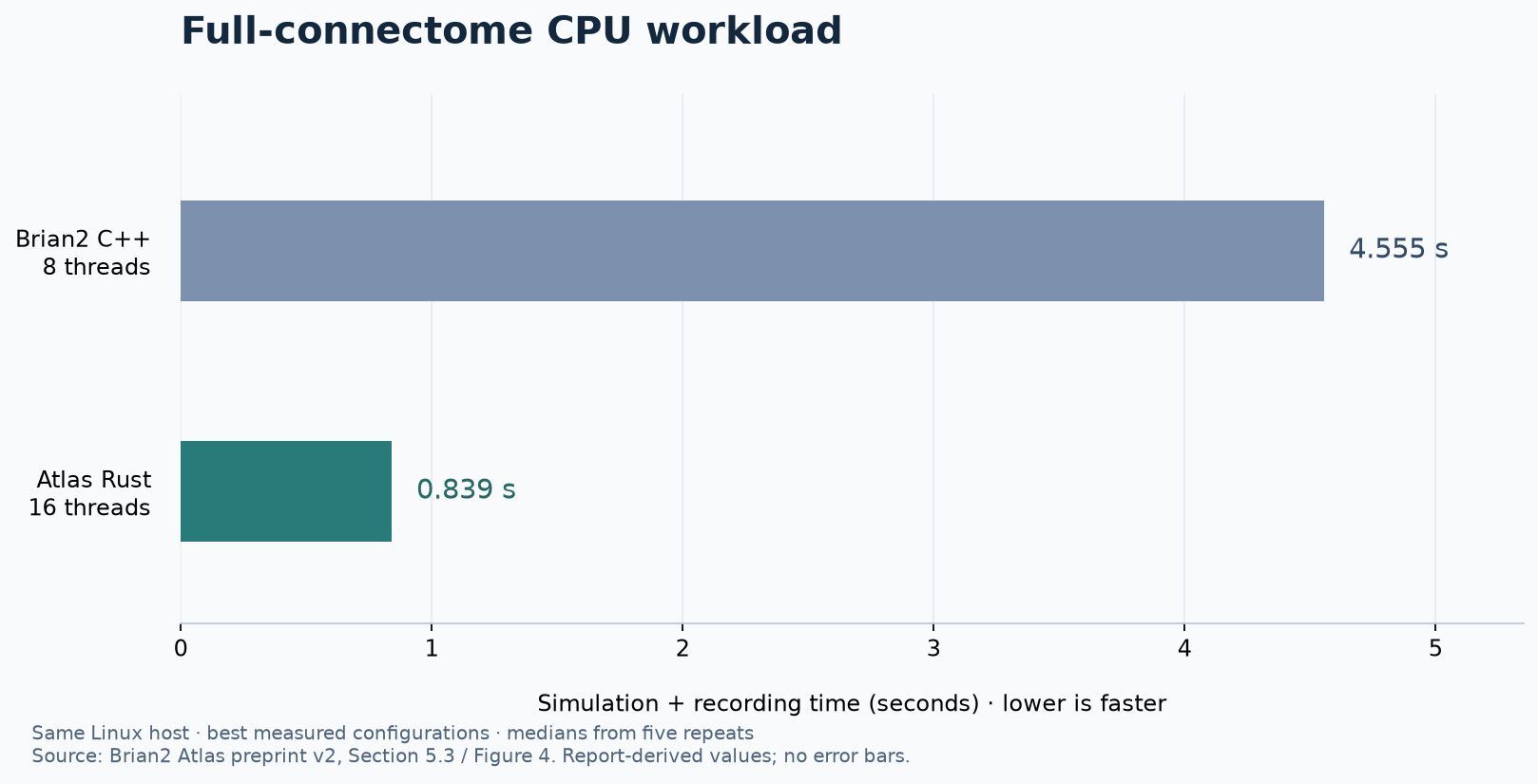
Time covers simulation and recording. Values are transcribed from the five-repeat cohort medians in preprint Section 5.3 and Figure 4; the chart shows no error bars because the accompanying evidence package does not contain the raw CPU samples. These are the best measured configurations, with different thread counts, on the same host.
Correctness checks accompany the timing measurements. The CPU cohort's formal replays passed the same-host comparisons for the checked arrays. The manuscript records the observations used for these checks, alongside the configurations and source identities. Other workloads have different performance characteristics; the paper also reports cases where its native CUDA path was slower than the compared alternatives.
Making a large model fit on a laptop
A PD14 workload containing 77,169 neurons and 298,880,968 synapses completed ten seconds of model time on a 16 GB Apple M3 laptop, with recording disabled. The native simulation body took 104.009 seconds; the frontend/build/run/load interval was 125.586 seconds.
The compared C++ attempt exceeded its controlled memory budget during preparation, before simulation. This experiment therefore answers a capacity question: can the model be prepared and executed within the available memory? It provides no completed local C++ simulation time from which to calculate a speed ratio. The preparation method is part of what makes the experiment feasible. Preprint, Section 5.3.
Executing a multi-area model across nodes
A separate distributed run completed 100.5 seconds of model time for 4,129,924 neurons and 24,126,516,728 recurrent synapses, using four nodes and 32 MPI ranks. Its records include output checks and measured resource use.
This establishes a completed capacity configuration for that model and source snapshot. The manuscript separately discusses repeat executions, reference runs and the work needed to compare performance under matched conditions. Keeping those records distinct makes the result more useful to someone planning a reproduction. Preprint, Section 5.2.
Start with one neuron
The quickest way to understand the interface is a small CPU simulation. After following the v0.1.0 source installation guide, save and run:
import brian2 as b
import brian2_atlas

b.set_device("atlas", engine="reference")
group = b.NeuronGroup(
    1, "dv/dt = (1.5-v)/(10*ms) : 1",
    threshold="v>1", reset="v=0",
    method="euler", dt=0.1*b.ms,
)
spikes = b.SpikeMonitor(group)
b.Network(group, spikes).run(100*b.ms)
print(spikes.num_spikes)  # 9
From there, the source examples introduce additional simulation, training and checkpoint workflows. The installation guide identifies the Python and compiler prerequisites; the backend guide covers the additional GPU and MPI requirements.
How Atlas fits into Next Brain
Brian2 Atlas is the open-source engine. Next Brain is the online research platform built around supported engine workflows. You can install Atlas and run it on your own machines without a Next Brain account.
On the platform, you can explore an adaptive LIF population through browser execution, or follow the spiking-network training tutorial. The platform connects models with interfaces for setting up work, inspecting activity, comparing results and retaining research records. Account-based training also needs an available worker.
The two entry points serve different working styles: source code gives you a programmable engine, while the platform offers a way to explore supported models and experiments online.
Build on the work
The public code and evidence make it possible to inspect an implementation decision, reproduce a documented experiment or propose a new test. Questions, bug reports and contributions are welcome through GitHub issues. Research collaborations can also reach us at [email protected].
When reproducing a paper result, start with the evidence repository and its recorded source version. The current product checkout and a historical experimental snapshot have their own identities. For software citations, use CITATION.cff and record the commit used.
Original Atlas engine code is licensed under Apache-2.0; retained Brian2 code remains under CeCILL 2.1, as described in the licence scope. The manuscript and slides are by Xinjun Li, Next Brain, and shared under CC BY 4.0.